What BOOM replaces

Running operations across chat and spreadsheets has a price. These modules are how you stop paying it.

Orders in WhatsApp, stock in a file that was accurate yesterday, supplier dues in someone’s head — every gap between those is where an order goes missing, a stockout goes unnoticed, or a payment goes unchased. BOOM puts the same records in front of everyone who needs them, on your servers, for one payment.

Self-hosted Fully customizable One-time license Mobile-ready PWA

Six modules, one set of records

Orders, stock, purchases, payments, tasks and profit all read from the same customers, products and suppliers. Nothing gets re-entered, and nobody has to ask another team what the current number is.

01

Order management & billing

An order that lives only in a chat thread can be missed, billed late, or never chased. Here every order has one record from placement to payment, with what’s still owed sitting on it.

  • Status tracking: pending, in-progress, delivered, cancelled
  • Invoice numbers, due amounts, and partial payment tracking
  • Bulk status updates and order import from spreadsheets
  • Customer-linked order history and internal notes
Guide: managing wholesale orders from WhatsApp →
02

Inventory management

The sale you lose is the one you didn’t know you couldn’t fulfil. Stock moves as orders and purchases move, and low stock surfaces while there’s still time to reorder.

  • SKU-level tracking with categories and supplier mapping
  • Low-stock and out-of-stock alerts on the dashboard
  • Quick stock updates with reason logging
  • Product performance tied to revenue and profit data
Guide: replacing Excel for inventory →
03

Purchase & supplier management

“How much do we owe them?” should be a lookup, not a phone call to the one person who knows. Purchases, bills and pending payables sit against each supplier, linked to the stock they brought in.

  • Supplier records with purchase history and contact details
  • Purchase order creation linked to product catalog
  • Supplier bills, pending amounts, and payment tracking
  • Restricted supplier portal for bill and payment visibility
Guide: tracking supplier dues and payables →
04

Payments, dues & collections

Money owed to you and money you owe drift apart when they’re tracked in different files. Receivables and payables sit in one view, each traced back to the order or purchase that created it.

  • Customer payment collection with partial payment support
  • Supplier payout tracking and pending payable totals
  • Razorpay checkout integration for online collections
  • Transaction references, notes, and payment history filters
Guide: tracking customer outstanding →
05

Task & workflow management

Work assigned in a chat has no owner by Friday. Every task carries an assignee, a deadline and a visible status — so you hear about a slip from the system, not from a customer.

  • Task creation with priority, due date, and assignee
  • Pending, in-progress, completed, and overdue tracking
  • Comments and file attachments on task records
  • Bulk status updates and dashboard task summaries
06

Profit analytics & reporting

Without cost sitting next to revenue, pricing and purchasing stay guesses. BOOM puts margin on every product, so you can see what earns and what quietly eats it.

  • Revenue, COGS, total profit, and margin over time
  • Top-performing and loss-making product detection
  • Order status distribution and revenue trend charts
  • Time-filtered dashboards: 7-day, 30-day, custom range
Guide: finding real profit per product →

How it looks in daily use

The screens your team will actually be in — the order list, the stock view, and the profit page owners open first.

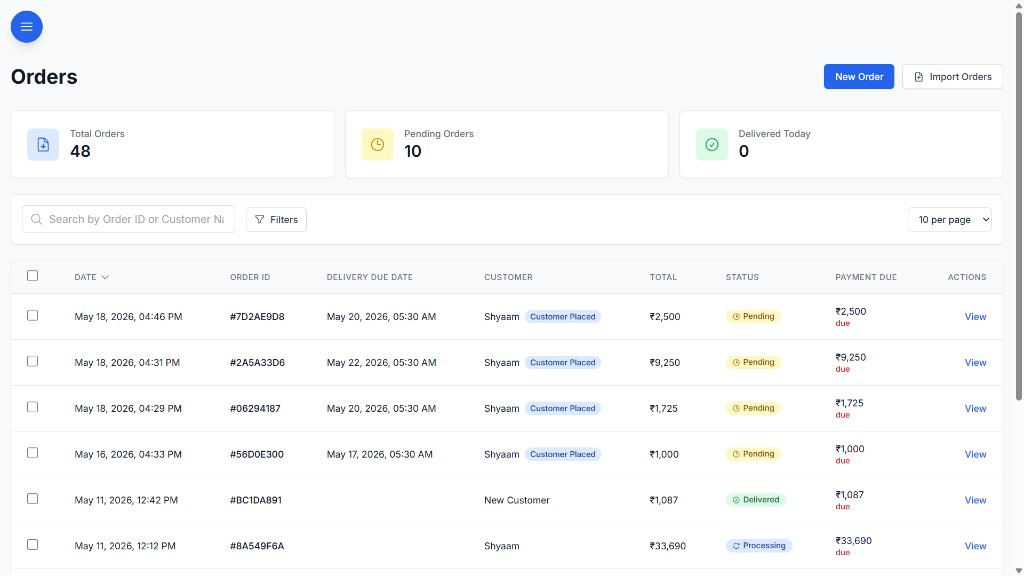
Order management: one record per order

When orders live across chat and spreadsheets, the expensive ones are the ones nobody notices missing. One record per order — status, billing, customer context, follow-up history — so an order can’t quietly stop moving.

  • Searchable order lists with date filters and sort controls
  • Status workflow from placement through delivery
  • Invoice and due amount tracking per order
  • Staff-scoped views so frontline teams see only what they need
BOOM orders module with status tracking, billing, and customer details

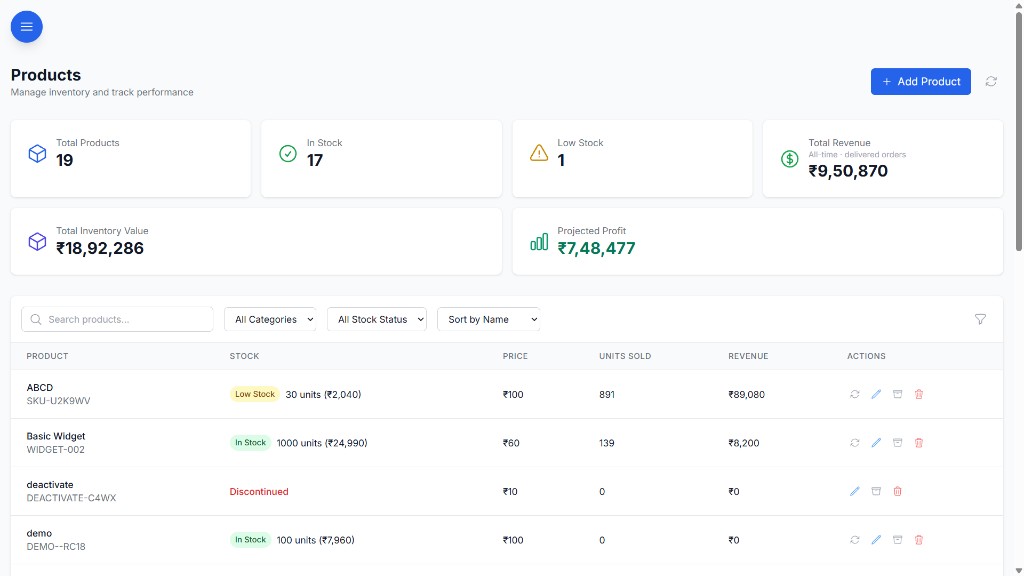
Inventory management: low stock before stockouts

A stockout you hear about from a customer costs the order and the confidence. Product, SKU, supplier and stock movement stay connected, so what’s running low shows up before you have to refuse someone.

  • Dashboard low-stock alerts before stockouts occur
  • Product detail pages with stock history and supplier links
  • Category and segment filtering across large catalogs
  • Inventory analytics tied to sales and profit performance
BOOM inventory module with stock levels, categories, and low-stock alerts

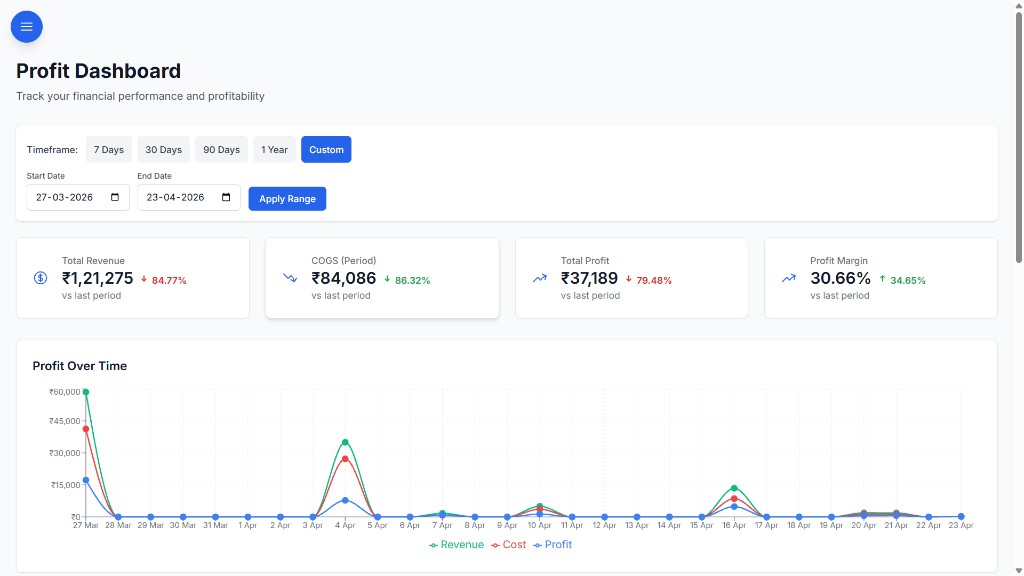
Profit dashboard & reporting

Guessed margins set the wrong prices and buy the wrong stock. Revenue, cost and margin are calculated from the orders and purchases already in the system.

Know which products are making money and which are draining it — without building a single formula.

  • Profit dashboard with revenue, COGS, and margin trends
  • Profitable products table and loss-making product alerts
  • Profit insights with actionable business signals
  • Export-ready analytics for management reporting
BOOM profit dashboard with revenue, COGS, margin, and product performance

Stop being the status desk for your own customers

Your team answers the same three questions all day: where is my order, what do I owe, when were we paid. Portals let customers and suppliers answer those themselves — scoped so each one sees only their own account.

Customer portal

Every “where is my order?” call pulls someone off actual work. Customers see their own orders, bills, dues and payment history — and can pay from the same screen.

  • View order status and billing details
  • See pending dues and payment history
  • Pay via Razorpay checkout from the portal
  • Chat with admin for support and requests

Supplier portal

Suppliers chasing payment status make your team reconcile the same bill twice. They get a restricted view of their purchases, bills, pending amount and recent payments — and nothing else.

  • Purchase and bill visibility scoped to their account
  • Pending amount totals and payment history
  • Direct chat with admin for queries
  • No access to other suppliers' or internal data

Role-based access control

Who can see what shouldn’t depend on trust and memory. Six roles — Admin, Manager, Staff, Viewer, Customer, Supplier — decide what each person can open, and the navigation adapts so nobody is browsing screens they aren’t meant to see.

  • 40+ granular permission keys across all modules
  • Permission-scoped navigation — no unauthorized menu items
  • Route-level guards enforce access on every page
  • Custom role configuration during implementation

Chat & notifications

A decision made in a personal chat leaves no trace against the order it changed. Conversations stay inside BOOM, attached to the customer, supplier or task they’re about.

  • Admin-to-customer and admin-to-supplier chat threads
  • Search, unread counts, and seen status
  • File attachments in conversation threads
  • Push notifications for tasks, payments, chat, and low-stock alerts

What is BOOM?

BOOM by YNIIDI (Business Operations & Optimization Management) is a self-hosted ERP alternative sold as a one-time license. It replaces Excel inventory sheets, WhatsApp order threads and supplier dues kept from memory with one customizable system for order management and billing, inventory management, purchase and supplier management, customer and supplier dues, payment collection, customer and supplier portals, profit reporting, task management and role-based team coordination. It runs on the customer’s own servers, with no per-seat fees and no mandatory SaaS subscription. See one-time license pricing or how wholesalers, distributors and manufacturers use it.

Module questions

Does BOOM include order management?

Yes. Every order gets one record from placement to payment, with status tracking, invoice numbers, due amounts, partial payments, bulk status updates and order import from spreadsheets. It replaces taking and tracking orders in WhatsApp threads.

Can BOOM replace an Excel inventory sheet?

Yes. BOOM’s inventory management tracks stock at SKU level with categories and supplier mapping. Stock moves as orders and purchases move, and low-stock alerts appear on the dashboard before you run out.

How does BOOM track supplier dues?

Purchases, supplier bills and pending payables are recorded against each supplier and linked to the stock they supplied, so what you owe each supplier is a lookup rather than a phone call.

Which BOOM edition includes the customer and supplier portals?

The full BOOM edition (from ₹5,00,000, one-time license) includes the customer portal, supplier portal and payment gateway integration. BOOM Lite (from ₹2,00,000) covers the core internal modules without portals.

See BOOM against your own operation

We’ll walk through the modules that map to your order volume, stock and supplier setup — not a generic feature tour.

Book a demo