
In many wholesale and manufacturing businesses, supplier dues live in three places: a notebook in the owner’s drawer, the accountant’s ledger that is updated at month-end, and the memory of one person who “just knows”. That works until the supplier calls and nobody can give a straight answer, or until you pay the same bill twice. This guide covers a method that works with nothing more than a spreadsheet, and when it is time to move beyond it.
Why supplier dues get lost
- One person holds the number. The owner, the accountant or the purchase manager knows roughly what is owed. When that person is travelling or leaves, nobody else can answer.
- Payments don’t say what they paid for. A UPI transfer here, an NEFT there, some cash, a post-dated cheque. Without a bill reference on each payment, you can see money went out but not which bill it settled.
- Partial payments and advances. “Paid 50,000 against the March bills, and 20,000 advance for the next lot.” A running total in a notebook can’t hold that detail for long.
- Goods and bills don’t match. The bill says 500 bundles, 460 arrived, 12 were damaged. If nobody records the difference, you pay for goods you never received.
- Returns and rate differences. Debit notes, credit notes and rate disputes are agreed on the phone and forgotten by the time payment is made.
- The ledger is weeks behind. Accounting entries are often posted in bulk at month-end, so the purchase team is working from old numbers during the month.
- Due dates are missed. Without due dates calculated from credit terms, payments go out when the supplier complains, not when they are due.
The cost is real: overpayments, double payments, strained relationships, and suppliers who tighten credit terms because you look disorganised, even when you are paying.
A method that works without new software
The principle: bills and payments are recorded; balances are calculated. Nobody should ever type “amount owed” by hand.
- Create a supplier master. One row per supplier: name, contact person, phone, GSTIN if applicable, and agreed credit terms in days. Give each a short code so the same supplier isn’t entered three ways.
- Record every bill the day it arrives. A bill register with one row per bill: bill date, supplier, bill number, amount, due date (bill date plus credit days) and the purchase order or goods receipt it relates to. Bills in a drawer are dues you can’t see.
- Match goods received before accepting the bill. Check quantity and rate against what actually arrived. Note shortages, damage and rate differences in the register so the payable is the correct figure, not the invoiced one.
- Record every payment against a bill. A payment register: date, supplier, amount, mode (UPI, NEFT, cheque, cash), reference (UTR or cheque number) and which bill or bills it settles. Record advances as advances, to be adjusted against the next bill.
- Calculate pending per bill and per supplier. Pending per bill is bill amount minus payments allocated to it. Pending per supplier is the sum. A SUMIFS on the two registers does this. Add an “overdue” column that compares due date with today.
- Review weekly, reconcile monthly. Every week, list bills due this week, overdue bills and disputed bills, and decide what gets paid. Every month, compare your balance with the statement from each major supplier and resolve differences while they are still fresh.
One more control matters as you grow: separate who records bills from who approves payments. It protects both the business and the staff.
If your accountant already keeps supplier ledgers
Keep them. Your accounting software is the right place for books, GST and statutory compliance. The problem this guide solves is operational: the purchase team, the godown and the owner need to know what has been ordered, what has arrived, what has been billed and what is still owed, during the month, without waiting for accounts. The two should agree; they don’t have to be the same tool.
Where the spreadsheet stops working
The bill and payment registers work well for a handful of suppliers and one person maintaining them. They strain when purchase orders, goods receipts, stock and payments are all in different files; when several people record bills and payments; when suppliers keep calling for their balance; and when you want to see supplier dues next to the stock they supplied and the margin it earned. At that point, you are reconciling the same purchase in three places every month.
Your options, compared honestly
| Option | Good at | Where it breaks | Fits |
|---|---|---|---|
| Notebook or diary | Always at hand, no learning curve | One copy, one person, no bill-level detail, no due dates, lost if the person leaves | Very few suppliers, owner handles everything |
| Excel bill and payment registers | Bill-level tracking, calculated balances, free | Manual entry, not linked to purchase orders or stock, breaks with several editors | Small businesses with disciplined same-day entry |
| Accounting software | Proper ledgers, GST and statutory compliance | Often updated late; not linked to purchase orders, goods received and stock for the operations team | Everyone needs it for books; it complements an operations system |
| Operations system (e.g. BOOM) | Purchases, bills, payments and stock linked per supplier; pending payables visible to the right people | Needs setup and a one-time investment; not a replacement for accounting or GST filing | Wholesalers, distributors and manufacturers with many suppliers and several people buying |
How this works in BOOM
In BOOM, purchases, supplier bills and payments are recorded against each supplier and linked to the stock they supplied. Receivables and payables sit in one payments view, each traced back to the order or purchase that created it.
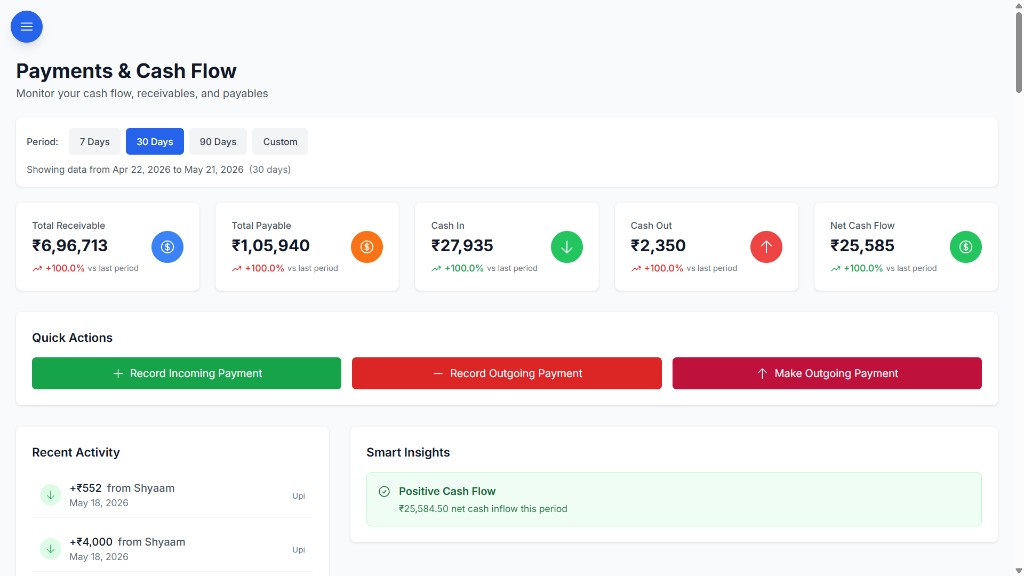
- Supplier records with purchase history and contact details.
- Purchase orders created from your product catalogue, so goods received update stock.
- Supplier bills, pending amounts and payment tracking, with pending payable totals per supplier.
- Transaction references, notes and payment history filters, so every payment says what it paid for.
- Roles and permissions: six roles and 40+ permission keys decide who can record purchases and who can see or record payments.
- Supplier portal (full BOOM edition): each supplier sees only their own purchases, bills, pending amount and recent payments, which cuts down “when will I be paid?” calls.
- Data export, so your accountant can take what they need into the books.
BOOM is self-hosted on your own server, VPS or private cloud, customized to how you buy and pay, and bought with a one-time license with no per-seat fees. See all modules or pricing.
When BOOM is not the right fit
- You buy from a few suppliers and handle payments yourself. The two registers above are enough.
- You are looking for accounting or GST software. BOOM does not file GST returns, generate e-invoices or e-way bills, or replace your books. Keep your accounting software for that.
- You want a cheap monthly plan. BOOM Lite starts from ₹2,00,000 and BOOM from ₹5,00,000, one-time. If a monthly subscription suits you better, choose that.
- You need an SAP-scale, multi-entity procurement suite. BOOM is built for mid-sized operations.
Frequently asked questions
What is the simplest way to track supplier dues?
Keep two lists: every supplier bill with its amount and due date, and every payment with the bill it settles. The amount you owe each supplier is total bills minus payments allocated to them. A spreadsheet works for a handful of suppliers if it is updated the same day.
My accountant already keeps supplier ledgers in accounting software. Do I need anything else?
Keep the accounting ledger for books and compliance. The gap is usually operational: the ledger is updated days or weeks later, and it is not linked to the purchase order, the goods received or the stock. If the purchase team cannot answer what is owed and what has arrived without asking accounts, an operations system closes that gap.
How does BOOM track supplier payables?
In BOOM, purchases, supplier bills, payments and pending amounts are recorded against each supplier and linked to the stock they supplied. Pending payable totals, transaction references and payment history are visible in one place, so what you owe a supplier is a lookup rather than a phone call.
Can suppliers see their own dues in BOOM?
Yes, with the full BOOM edition (from ₹5,00,000, one-time license). The supplier portal gives each supplier a restricted view of their own purchases, bills, pending amount and payment history, and nothing else. BOOM Lite (from ₹2,00,000) covers supplier and payables tracking internally without the portal.
Does BOOM handle GST returns or TDS on supplier payments?
No. BOOM is an operations system, not an accounting or GST compliance tool. Keep your accounting software and accountant for GST returns and statutory filings. BOOM tracks the operational side: purchases, bills, pending payables and payments.
See your supplier dues in one view
Tell us how many suppliers you buy from and how payments are tracked today. We’ll show you how purchases, bills and payables would look in BOOM.