
What “outgrown Tally” usually means
When an owner says “we’ve outgrown Tally”, the accounts are usually fine. The accountant posts entries, GST gets filed, the CA gets the books at year-end. What has broken is everything that happens before an entry reaches the accountant.
Tally includes inventory and order features, and plenty of businesses use them well. In many Indian SMEs, though, it is operated by one accountant, and the sales team, dispatch, godown and owner do not work in it. The operational truth lives somewhere else:
- Orders arrive on WhatsApp and phone and are written into a sheet — or not.
- Stock is in an Excel file that the godown updates “when there is time”.
- Customer dues are in the accountant’s system, but the salesman promising the next dispatch cannot see them.
- Supplier payments are tracked in the owner’s head and a diary.
- Who is supposed to do what by when is in a group chat, scrolled past by lunch.
So the real problem is not the accounting software. It is that the business has no shared operational record, and the books are the only structured system in the building.
Signs you have outgrown spreadsheets for operations
If three or more of these are true every week, the cost of the current way is probably higher than you think:
- There are several versions of the same sheet, and nobody is sure which is current.
- Stock in the file does not match stock in the godown, and a physical count is the only way to know.
- “Where is my order?” needs a phone call to dispatch before you can answer the customer.
- Two people quote the same customer two different outstanding amounts.
- Month-end reconciliation between sales, stock and accounts takes days.
- You, the owner, are the only person who knows the full picture — and you cannot take a week off.
- Every new staff member adds confusion instead of capacity.
If none of these sound familiar, you may not need anything new. A tidy shared sheet and a clear process can take a business surprisingly far.
How to move, step by step — whatever you choose
These steps apply whether you end up with BOOM, another tool, or simply a better-structured set of sheets.
- Write down what stays in accounting. Books, GST returns, e-invoicing, e-way bills, TDS, statutory reports. Your accountant keeps all of it. Nothing about fixing operations should disturb compliance.
- Map the daily operational flows. For order intake, dispatch, stock, purchases, collections and tasks: who does what, in which tool, and where the information goes next. A whiteboard and an hour with your team is enough.
- Find the numbers that disagree. Stock counts, customer dues, order status, supplier balances. The places where three sources give three answers are where money is leaking.
- Define the handoff to accounts. Decide what the accountant needs from operations — sales, purchases, payments received and made — in what format, how often, and who checks that the two sides agree.
- Clean master data. One name and code for every customer, product and supplier, used the same way in operations and in accounts. This is dull work and it matters more than any software choice.
- Move in phases. Orders and stock first, because they touch everyone. Then customer and supplier dues. Then portals, tasks and reporting. Switching everything on one Monday is how rollouts fail.
- Run in parallel, then retire the sheets. Keep the old sheet going for a short, fixed period, compare numbers, fix gaps, and then stop maintaining it. If both are kept “just in case”, the team will trust neither.
Your options, honestly compared
| Option | Fits when | Watch out for |
|---|---|---|
| Tighten your Excel and shared sheets | Small team, modest order volume, one person who owns the file | Breaks again as people and orders grow; no permissions or audit trail worth the name |
| Use more of your accounting software for operations | Your staff are comfortable working in accounting screens and processes are simple | Sales, godown and dispatch teams often resist it; customer and supplier self-service is limited |
| Monthly SaaS order or inventory apps | You want to start fast with little upfront cost and standard workflows | Subscription and per-user costs that grow with the team; data held on the vendor’s cloud; limited customization |
| Large enterprise ERP | Multi-entity, multi-country businesses with an IT team and a long implementation budget | Cost, time and complexity far beyond what most mid-sized traders and manufacturers need |
| Customized operations system such as BOOM | Wholesalers, distributors, retailers, manufacturers and import/export firms with a team, running on Excel and WhatsApp | Upfront one-time investment; you need a server or VPS; accounting stays in separate software |
How this works in BOOM
BOOM by YNIIDI is built to be that operations layer. It does not try to be your accounting software. It gives the whole team one set of records for the work that happens every day, and it sits alongside your accountant’s Tally.
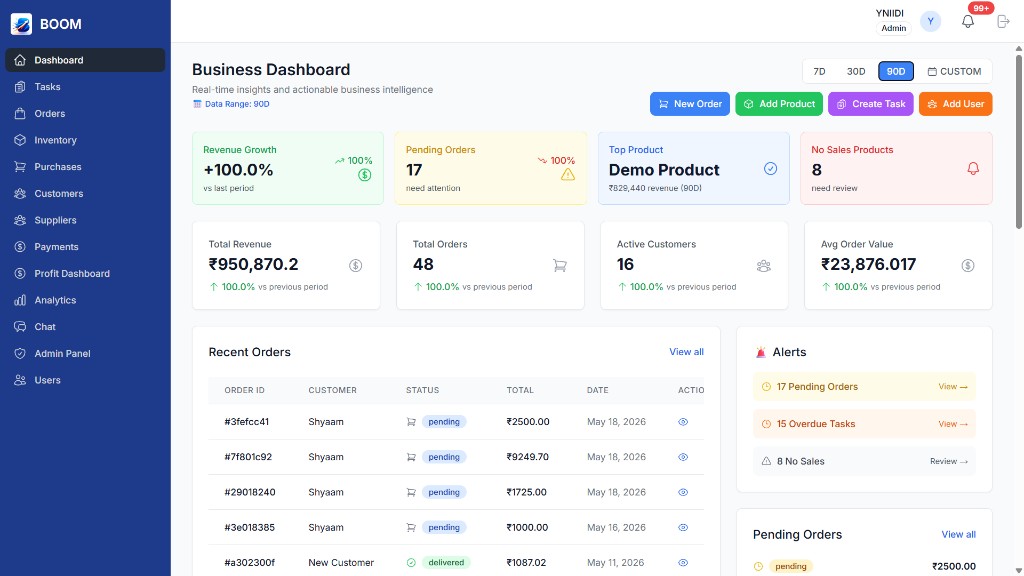
- Orders and billing: one record per order from placement to payment, with status, invoice number and amount due. Orders can be imported from spreadsheets.
- Inventory: live stock that moves with orders and purchases, with low-stock alerts on the dashboard.
- Purchases and suppliers: purchase orders, supplier bills and payables against each supplier.
- Customers and payments: customer history and dues, partial payments, and Razorpay collection in the full edition.
- Tasks and team chat: work with an owner, a deadline and a status, and conversations attached to the customer or supplier they are about.
- Profit dashboard: revenue, COGS and margin by product from the same data.
- Six roles, 40+ permission keys, no per-seat fees: Admin, Manager, Staff, Viewer, Customer and Supplier. Your godown staff can work in the system without seeing margins, and adding people does not add a monthly bill.
- Handoff to accounts: data export lets your accountant receive orders, purchases and payments in an agreed format for the books.
Rollout follows the phased approach above: scope mapping, then setup and data migration from your sheets, then team enablement. See how deployment works. BOOM is self-hosted on your own server, VPS or private cloud, and sold as a one-time license — BOOM Lite from ₹2,00,000, BOOM from ₹5,00,000 with customer and supplier portals. Final price depends on scope.
When BOOM is not the right fit
- You want to replace Tally itself. BOOM does not do GST return filing, e-invoicing, e-way bills or statutory accounting. If that is what you are shopping for, you need accounting software, not BOOM.
- Your current setup still works. If the signs above do not apply, tighten your sheets and revisit in a year.
- You are a solo or very small operation. The investment will not pay back when one person can hold everything in their head.
- You want the lowest monthly price. BOOM is a one-time license, not a cheap subscription.
- You need a global, multi-entity ERP. BOOM is not built for SAP-scale enterprises.