
For most Indian wholesalers and distributors, WhatsApp is where orders actually arrive. A retailer sends a photo of a handwritten list, a regular customer sends a voice note, a salesman forwards an order from the field. It is fast, everyone already uses it, and customers won’t switch to your app. None of that is the problem. The problem is what happens after the message arrives.
Why orders get lost in WhatsApp
Nobody loses an order on purpose. They get lost because a chat is built for conversation, not for tracking work until it is finished. The usual ways it breaks:
- The order scrolls away. An order sent at 9 am is buried under forty messages by lunch. If nobody acted on it immediately, it is effectively gone until the customer calls to ask where it is.
- Orders sit on personal phones. Three salespeople, three phones, three sets of chats. The owner has no single view of what was ordered today, and when a salesperson leaves, his order history leaves with him.
- Changes get lost in the thread. “Make it 40 cartons, not 30.” “Hold the second item.” “Send with tomorrow’s truck.” The godown packs from the first message, not the fifth.
- There is no status. A chat cannot tell you whether an order is confirmed, packed, dispatched, billed or paid. So someone has to ask, and usually that someone is the owner.
- Stock isn’t checked before confirming. The order is accepted on chat, then the godown finds only half the quantity. The customer hears about it at delivery time.
- Billing and collection lag. If the order is not recorded properly, the bill goes out late or wrong, and the due amount is chased late or never.
- The owner becomes the status desk. “Where is my order?” calls and messages take hours of the most expensive person’s day.
Each of these is small. Together they mean missed orders, short supplies, late bills and customers who quietly start ordering from someone more reliable.
A routine that works this week, without new software
You can fix most of this with discipline and a shared sheet before you spend a rupee. The principle is simple: WhatsApp is the inbox, not the record.
- Receive orders on one business number. Move customer ordering to one WhatsApp Business number that the office controls, not salespeople’s personal phones. Use labels such as New order, Confirmed and Dispatched so unprocessed chats stand out.
- Copy every order into one register the same day. One Google Sheet or Excel file, one row per order, with fixed columns: order number, date, customer, items, quantity, rate, amount, promised date, status, owner, amount paid and amount due. If it is not in the register, it is not an order.
- Give every order a number and send it back. Reply to the customer with “Order #1245 confirmed”. Now both sides refer to the same order when quantities change or payment is discussed.
- Use a fixed set of statuses. For example: Received, Confirmed, Packed, Dispatched, Delivered, Billed, Paid. Use a dropdown so nobody invents new ones, and never leave the status blank.
- Check stock before confirming. Confirm only after someone has checked what is actually available. When a customer changes the order on chat, update the register row, not just the chat.
- Review open orders daily. Fifteen minutes every morning: filter the register for anything not Delivered or not Paid. Every open order gets a named owner and a next action.
Two more habits make a big difference. First, one person owns the register, even if several people add to it. Second, do not let orders be confirmed by voice call without a row being created. The register only works if it is complete.
Where the sheet stops working
A disciplined register will get a small team a long way. It starts to strain when:
- Several people edit the same file at once and rows get overwritten or duplicated.
- Stock is in a different sheet, so confirming an order still means asking the godown.
- Payments are tracked somewhere else, so the due amount on the order is often wrong.
- Nobody can tell who changed a quantity, or when.
- The same order is entered three times: in the register, in the stock sheet and in the billing software. That double and triple entry is where mistakes come from.
- Customers still message to ask for status because they cannot see the register.
At that point the problem is no longer discipline. It is that orders, stock and payments live in separate places and have to be kept in sync by hand.
Your options, compared honestly
| Option | Good at | Where it breaks | Fits |
|---|---|---|---|
| WhatsApp alone | Fast, free, customers already use it | No status, no single view, orders scroll away, history sits on personal phones | Very small volumes handled by one person |
| WhatsApp + Google Sheets register | Cheap, flexible, gives every order a number and status | Manual re-entry, no link to stock or payments, easy to overwrite | Small teams willing to keep strict daily discipline |
| WhatsApp ordering or catalogue apps | Structured order capture from customers | Usually stop at order capture; stock, purchases and dues are elsewhere. Typically a monthly subscription | Businesses whose main problem is capture, not what happens after |
| GST billing software | Invoices, tax compliance, accounting ledgers | Built for the bill, not for tracking an order from confirmation to dispatch and follow-up | Everyone needs it for billing and compliance; it complements an order system |
| Operations system (e.g. BOOM) | One record per order, linked to stock, billing, dues and the customer | Needs setup and a one-time investment; overkill for very small operations | Growing wholesalers, distributors and manufacturers with several people handling orders |
Many businesses end up with a combination: customers order on WhatsApp, the team works in an operations system, and the accountant keeps GST billing and books in accounting software.
How this works in BOOM
In BOOM, every order gets one record from placement to payment. Customers can still send orders on WhatsApp; your team enters them in BOOM (or imports them from a spreadsheet), and from then on the team works from the record, not the chat.
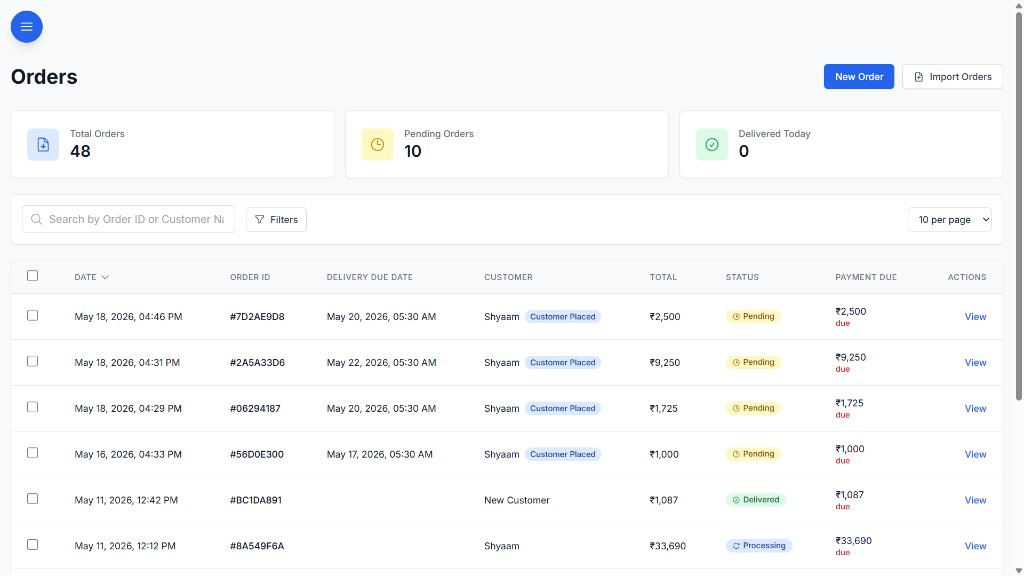
- Status tracking from pending through in-progress to delivered or cancelled, with bulk status updates for busy days.
- Invoice numbers, due amounts and partial payments sit on the order, so what is still owed is visible without opening another file.
- Stock moves as orders move, and low-stock alerts appear on the dashboard, so confirming an order does not mean calling the godown.
- Customer-linked order history and internal notes, so a change agreed on the phone is written against the order.
- Staff-scoped views and six roles (Admin, Manager, Staff, Viewer, Customer, Supplier), so frontline staff see only what they need.
- Customer portal (full BOOM edition): customers see their own order status, bills and dues, and can pay via Razorpay, instead of asking on WhatsApp.
BOOM is self-hosted on your own server, VPS or private cloud, customized to your workflow during implementation, and bought with a one-time license. There are no per-seat fees, so adding salespeople or godown staff does not add a monthly bill. See all modules.
When BOOM is not the right fit
Be honest with yourself before booking a demo:
- You handle a few orders a day yourself. The WhatsApp-plus-sheet routine above is enough. Come back when more people are involved.
- You want a cheap monthly subscription. BOOM is a one-time license starting from ₹2,00,000. If you would rather pay a small amount monthly, a SaaS tool will suit you better.
- You need GST return filing, e-invoicing or e-way bills. BOOM is not an accounting or GST compliance tool. Keep your accounting software for that; BOOM handles operations around it.
- You run a multi-country enterprise that needs an SAP-scale suite. BOOM is built for mid-sized operations, not global ERP programmes.
Frequently asked questions
Can I keep taking orders on WhatsApp if I use an order management system?
Yes. Most wholesale customers will keep ordering on WhatsApp, and that is fine. The change is that WhatsApp becomes the inbox, not the record. Every order is entered into the system with a number, status and owner, and the team works from the system instead of scrolling the chat.
Is a Google Sheet enough to track WhatsApp orders?
For a small team with a few dozen orders a week, a well-structured Google Sheet with fixed columns, statuses and one owner works. It starts failing when several people edit it at once, when stock and payments are tracked in separate files, and when nobody can tell who changed an order.
Does BOOM send orders to WhatsApp automatically?
BOOM does not replace WhatsApp as the channel your customers use. Orders are entered or imported into BOOM, where each one gets a record with status, invoice number, due amount and payment history. With the full BOOM edition, customers can also check their own order status and dues in the customer portal instead of asking on WhatsApp.
How much does an order management system like BOOM cost?
BOOM Lite starts from ₹2,00,000 and BOOM starts from ₹5,00,000, both as a one-time license with no per-seat fees and no mandatory subscription. The full BOOM edition adds the customer portal, supplier portal and payment gateway integration. Final price depends on customization scope.
See your order flow in BOOM
Tell us how orders arrive today and who handles them. We’ll show you how that flow looks in BOOM, and tell you straight if the sheet is still enough.