
Almost every wholesaler, distributor and manufacturer starts with an Excel stock sheet. It is free, flexible, and for the first few years it works. Then the business grows: more SKUs, more people, more orders coming in on WhatsApp. The sheet is still there, but nobody fully trusts it. This guide covers why that happens, what you can fix right now, and how to decide what to replace it with.
Why Excel inventory stops being true
Excel itself is not the problem. The problem is that a spreadsheet only knows what someone typed into it, and in a busy business, typing always runs behind reality.
- One person “knows” the stock. The sheet says 120 cartons, but you still call the godown in-charge to ask what is really there. When he is on leave, nobody can confirm an order with confidence.
- Double entry everywhere. The order comes in on WhatsApp, gets typed into the order sheet, then into the stock sheet, then into the billing software. Every re-entry is a chance to miss a row or type 30 instead of 300.
- Balances get overwritten. Most sheets hold one number per product, which is edited by hand. When it is wrong, there is no trail showing which sale or purchase was missed.
- Versions multiply. stock_final.xlsx, stock_final_v3.xlsx, stock_new_Rakesh.xlsx. Two people update two copies and neither is right.
- The same product has three names. “2 ply tissue 100”, “Tissue 2ply 100 pulls”, “T2-100”. Totals split across rows and reorder decisions are made on half the picture.
- Updates happen at night, or on Saturday. During the day, the sheet is always behind. Orders are confirmed against yesterday’s stock.
- Low stock is noticed by customers. Nothing warns you that an item is running out. You find out when a regular asks for it and you have to say no.
The cost is not the sheet. It is the lost sales from stockouts you didn’t see coming, the dead stock you bought because you thought you were short, and the hours spent reconciling.
Signs you have outgrown the sheet
If three or more of these are true, the sheet is costing you money every week:
- A physical count regularly differs from the sheet by more than a few items.
- More than two people edit the stock file.
- You have run out of a fast-moving item in the last month without warning.
- Stock, orders and purchases are in separate files.
- You cannot say what stock was on a given date last month, or why it changed.
- Only one or two people can answer “do we have this in stock?”
Fix the sheet first: steps that work without new software
Whether you stay on Excel or move to a system, do this first. Clean data is what makes any replacement work, and a messy sheet imported into new software is still a messy sheet.
- Build a clean product master. One row per SKU with a unique code, one consistent name, unit (carton, bundle, piece, kg), category and main supplier. Merge duplicates. This single step often explains half your stock differences.
- Count and set opening stock on a fixed date. Do a physical count of the godown, even if it takes a Sunday, and record it as opening stock on that date. Everything after starts from this count.
- Record movements, not balances. Stop overwriting the stock figure. Keep a movement log where every inward and outward is a row: date, SKU, quantity in or out, reason (sale, purchase, return, damage, adjustment), reference (order or bill number) and who entered it. Calculate current stock with a SUMIF on the log. Now every number has a trail.
- Update when goods move. Record the movement when goods leave or arrive, not at the end of the day. If the godown can’t reach a computer, a shared Google Sheet on a phone is better than a paper slip entered later.
- Set reorder levels. Give each SKU a minimum level based on how fast it sells and how long the supplier takes. Use conditional formatting to highlight anything at or below it, and check that list daily.
- Cycle count fast movers weekly. Count your top twenty items every week and record differences as adjustments with a reason. Small, frequent counts catch problems a yearly count never will.
Lock the structure too: one owner of the file, protected header rows and formulas, and version history (Google Sheets keeps it automatically).
Where even a good sheet runs out
A disciplined movement log will carry a small operation for a while. It stops scaling when stock needs to move automatically with orders and purchases, when several people need to update it at the same time from different places, and when you want stock tied to supplier dues, customer orders and profit per product. At that point, you are maintaining a homemade database by hand.
Your options, compared honestly
| Option | Good at | Where it breaks | Fits |
|---|---|---|---|
| Excel / Google Sheets | Free, flexible, everyone knows it | Manual updates, no link to orders or purchases, versions and overwrites, no alerts unless you build them | Small catalogues handled by one or two careful people |
| GST billing software with stock | Reduces stock when a bill is raised; invoicing and compliance | Stock tied to the bill, not to orders, purchases in progress, supplier dues or tasks | Businesses whose main need is billing, with simple stock |
| Standalone inventory app (SaaS) | Quick start, mobile stock updates | Stock only; orders, dues and profit live elsewhere. Monthly per-user fees add up as the team grows | Teams that only need stock tracking and prefer paying monthly |
| Operations system (e.g. BOOM) | Stock moves with orders and purchases; linked to suppliers, dues and profit | Needs setup and a one-time investment; more than a tiny business needs | Growing wholesalers, distributors and manufacturers with many SKUs and several people |
| Enterprise ERP | Deep, multi-entity, multi-country processes | Long, expensive implementation; heavy for mid-sized operations | Large enterprises with dedicated IT teams |
How this works in BOOM
BOOM’s inventory module tracks stock at SKU level, and stock moves as orders and purchases move. Nobody has to remember to update a separate sheet after taking an order or receiving goods.
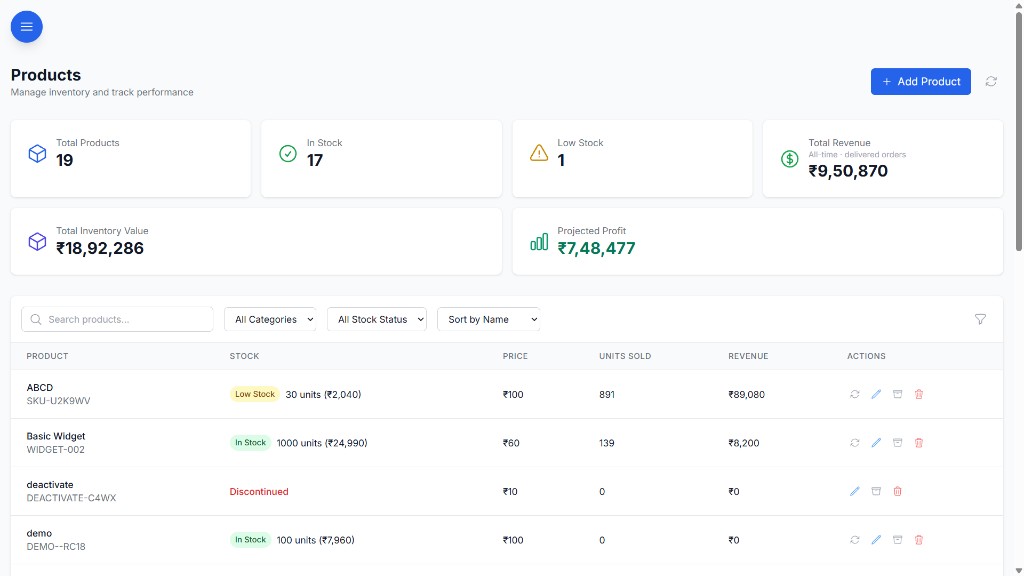
- SKU-level tracking with categories and supplier mapping, so the same product can’t live under three names.
- Low-stock and out-of-stock alerts on the dashboard, with push notifications, before a customer finds out.
- Quick stock updates with reason logging for damage, returns and count differences, so every change has a trail.
- Product detail pages with stock history and supplier links.
- Stock tied to profit: product performance sits next to revenue and margin, so you can see what earns and what just occupies the godown.
- Roles and permissions: six roles and 40+ permission keys decide who can update stock and who can see pricing and payments.
Your existing spreadsheet data is imported during setup, and BOOM is customized to how you count and sell. It runs on your own server, VPS or private cloud, with a one-time license and no per-seat fees. BOOM’s first deployment was at a tissue paper manufacturer. See all modules.
When BOOM is not the right fit
- Your catalogue is small and one person manages it. The cleaned-up movement log above is enough.
- You want a low monthly fee. BOOM Lite starts from ₹2,00,000 as a one-time license. If paying monthly suits your cash flow better, a SaaS inventory app is the honest recommendation.
- You need GST filing, e-invoicing or e-way bills. BOOM does not do these. Keep your accounting or billing software for compliance.
- You have very specific needs such as batch or expiry tracking. BOOM is customized per deployment, but raise it in the demo and confirm scope and price before assuming it is included.
Frequently asked questions
How do I know I have outgrown Excel for inventory?
The common signs are: the sheet does not match a physical count, more than one person edits it, stock is updated at day-end instead of when goods move, one person is the only one who knows the real stock, and you find out about stockouts from customers. If three or more apply, the sheet is costing you sales.
Can I import my existing Excel stock sheet into BOOM?
Yes. Existing spreadsheet data is imported during setup. It helps to clean the product list and do a physical count first, so the opening stock in BOOM is correct from day one.
Is GST billing software enough for inventory?
Billing software with a stock module reduces stock when you raise a bill, which is useful. It is weaker when stock needs to be tied to orders that are not yet billed, purchases in transit, supplier dues, tasks and profit per product. Many businesses keep billing software for invoicing and compliance and use an operations system for orders and stock.
Does BOOM replace Tally for inventory?
BOOM is not an accounting or GST filing tool, so it does not replace Tally for books and compliance. It replaces the Excel sheets and WhatsApp threads used for day-to-day operations: live stock, low-stock alerts, orders, purchases, supplier and customer dues and profit analytics.
Bring your stock sheet to the demo
Show us the sheet you use today. We’ll walk through how your SKUs, stock movements and reorder points would look in BOOM.