One system for shared records
Inventory, billing, supplier records, tasks, and dashboards stay connected instead of living in separate files.
Manage inventory, billing, suppliers, workflows, and team coordination in one system. Replace spreadsheets, disconnected tools, and manual processes with a single, scalable platform.
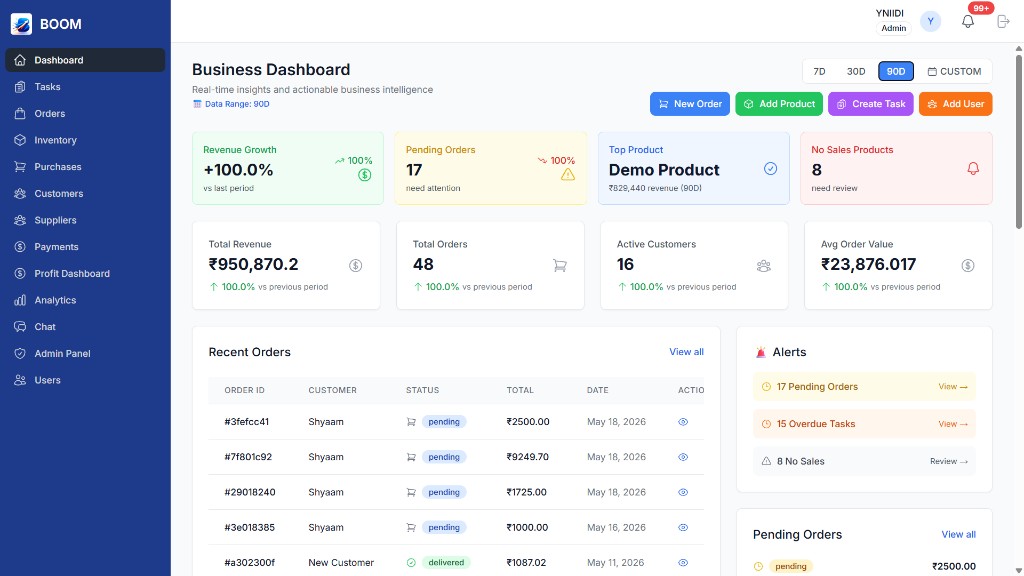
BOOM is a unified business operations platform that helps companies manage inventory, billing, suppliers, workflows, and internal coordination in one system. It gives teams a shared place to track stock, invoices, supplier activity, payments, tasks, portals, and reporting. BOOM replaces scattered spreadsheets and disconnected tools with structured records, clear ownership, and customization across modules, permissions, themes, screens, cards, rows, and workflows. BOOM is built for wholesalers, retailers, startups, operations-heavy companies, growing teams, and large teams that need scalable operations without losing control.
Inventory, billing, supplier records, tasks, and dashboards stay connected instead of living in separate files.
Managers can see who owns each workflow, what is delayed, which bills are pending, and what needs action next.
BOOM gives companies the structure of an ERP alternative without forcing teams into slow, complex legacy systems.
BOOM unifies inventory, billing, suppliers, workflows, and internal coordination into one system, so teams can see what is happening and act with less manual follow-up.
Inventory becomes unreliable when stock counts, product movement, and low-stock warnings are updated manually. BOOM gives teams inventory management software that keeps stock, products, suppliers, and alerts in one shared platform.
Supplier work gets delayed when purchase activity, pending bills, payment history, and communication are tracked separately. BOOM acts as a supplier management system that connects supplier records, bills, payments, and follow-up.
Billing becomes harder when invoices, dues, payments, and operational records do not match. BOOM connects billing and invoicing with inventory, suppliers, customer records, and workflows so financial follow-up has context.
Teams lose time when ownership, status, notes, and follow-up live in conversations instead of a shared system. BOOM gives teams workflow management software with assignments, alerts, comments, attachments, permissions, and dashboards.
Disconnected tools create duplicate work and unclear reporting as a company grows. BOOM replaces spreadsheets and disconnected tools with a single business operations platform built to scale across teams, records, suppliers, billing, and workflows.
BOOM features are built as practical systems for inventory management, billing, supplier management, workflow management, reporting, portals, and team coordination.
When work moves across people, updates can get lost. BOOM tracks operational requests, statuses, invoices, notes, imports, and ownership in one workspace.
Supplier work becomes hard to control when purchases, bills, payment status, and stock needs sit in different places. BOOM connects supplier records, purchase activity, supplier bills, pending amounts, and replenishment workflows.
Teams need clear reporting before problems become expensive. BOOM shows revenue trends, work summaries, product performance, task summaries, inventory analytics, and company-level metrics.
Important work gets missed when alerts depend on manual reminders. BOOM sends payment reminders, workflow alerts, low-stock warnings, chat updates, and activity notifications to the right people.
Operational conversations lose context when they happen outside the system. BOOM keeps admin, customer, and supplier chat connected with search, unread counts, seen status, mobile threads, and file attachments.
Customers create extra follow-up when they cannot see their own records. BOOM gives customer-role users restricted access to submit requests, view bills, see pending dues, pay through Razorpay, and chat with the team.
Suppliers need clarity without seeing unrelated company data. BOOM gives supplier-role users a restricted portal for completed bills, pending bills, total pending amount, payment history, and admin communication.
BOOM is a strong fit when teams search for inventory management software, supplier management systems, billing and invoicing systems, spreadsheet replacements, workflow management software, or a modern ERP alternative.
Inventory management software helps businesses track products, stock levels, stock movement, suppliers, and low-stock risks. Businesses need it because inventory errors create missed work, delayed fulfillment, wrong purchasing decisions, and unclear reporting.
BOOM solves this by connecting inventory with billing, supplier workflows, customer records, alerts, and reporting. Stock decisions stay connected to the rest of the operation instead of living in a separate spreadsheet.
A supplier management system helps companies organize supplier records, purchase activity, supplier bills, pending amounts, communication, and dependencies. Supplier coordination becomes difficult when these records are split across calls, messages, sheets, and separate software.
BOOM centralizes supplier tracking, supplier billing, payment history, replenishment needs, restricted supplier access, and admin communication. Teams can see what is owed, what is pending, and what needs action next.
A billing and invoicing system helps companies track invoices, paid bills, pending bills, partial payments, customer dues, supplier payables, transaction references, and payment history. Billing becomes inefficient when it is separated from operational records.
BOOM connects billing and invoicing with inventory, customers, suppliers, workflows, portals, and reporting. This gives teams financial visibility without losing the operational context behind each bill or payment.
Excel and manual workflows become fragile when companies need shared ownership, live status, secure permissions, alerts, and connected reporting. Spreadsheets are flexible, but they do not reliably manage inventory, billing, suppliers, workflows, and coordination together.
BOOM replaces spreadsheets and disconnected systems with one business operations platform. Teams get structured records, dashboards, task ownership, portals, communication, and reporting in one source of truth.
Traditional ERP systems can be powerful, but many teams find them complex, slow to adopt, and difficult for daily work. Companies often need a simpler ERP alternative that still centralizes operations across inventory, billing, suppliers, workflows, and reporting.
BOOM acts as a modern alternative to traditional ERP systems by keeping business operations unified, clear, customizable, and easier to use. BOOM centralizes business operations into one platform without forcing teams into a heavy legacy workflow.
BOOM is broad enough for different business models, but specific enough to solve the daily operational problems that wholesalers, retailers, startups, growing teams, and operations-heavy companies face.
Wholesalers often manage stock movement, supplier follow-up, customer billing, pending dues, and team coordination across many records. BOOM helps wholesalers centralize inventory, supplier management, billing, workflows, portals, and reporting in one business operations platform.
Retail businesses need clear visibility into products, stock status, payments, customers, staff workflows, and reporting. BOOM gives retail teams inventory management software, billing and invoicing, customer records, alerts, and workflow management in one system.
Growing teams outgrow spreadsheets when more people need access, ownership, permissions, and live status. BOOM helps growing teams replace manual tracking with shared records, dashboards, secure roles, task ownership, and connected reporting.
Operations-heavy companies need more than a simple task list. BOOM connects inventory, billing, suppliers, workflows, portals, chat, permissions, reporting, and internal coordination so complex work can be managed from one platform.
BOOM is built around the daily rhythm of business operations, not around disconnected menu screens.
Create records, import data, connect customers, attach notes, and let authorized portal users submit requests.
Monitor SKU performance, low-stock risk, quick stock updates, discontinued products, suppliers, and purchase requirements.
Create tasks linked to orders, products, customers, and team members with due dates, priority, comments, and attachments.
Record billing activity, received payments, partial dues, Razorpay payments, supplier payables, margins, and loss-makers.
Give customers their own bills and payments view, while suppliers get only their purchase-payment history and pending totals.
Keep Admin, Customer, and Supplier conversations inside BOOM with attachments, unread counts, seen status, and direct thread links.
BOOM replaces spreadsheets and disconnected tools, acts as a modern alternative to traditional ERP systems, and centralizes business operations into one platform.
Excel can track data, but it does not create real-time visibility, workflow ownership, secure permissions, or connected reporting. BOOM gives companies centralized records, live dashboards, inventory management, supplier tracking, billing, and workflow status in one platform.
Disconnected SaaS tools force teams to repeat data, chase updates, and reconcile different versions of truth. BOOM connects inventory management, billing and invoicing, supplier management, workflow management, portals, chat, and reporting in one simpler system.
Legacy ERP systems can be heavy, slow to adopt, and difficult for daily teams to use. BOOM is a modern ERP alternative that keeps the structure companies need while staying clear, customizable, self-hosted, mobile-ready, and scalable.
BOOM is not a monthly subscription product. Companies purchase BOOM as a one-time license, host it on their own system or server, and keep ownership of the system after purchase.
BOOM is sold as a one-time license purchase. After the license is purchased, the customer owns the system forever instead of paying a recurring software subscription fee.
BOOM can be deployed as a self-hosted business operations platform on the customer's own system or server. This gives the company more control over where the system runs and how it is managed.
Every BOOM implementation can be shaped around the company. Modules, permissions, themes, screens, cards, rows, workflows, and selected features can be customized based on what the business needs.
BOOM pricing depends on the customization scope and feature selection. The final price is discussed after contact is established and the required modules, permissions, themes, screens, and workflows are understood.
BOOM is suited for companies that want a business operating system they can own, customize, and run in their own environment rather than renting a fixed subscription tool.
The right BOOM setup depends on how the company manages inventory, billing, suppliers, workflows, portals, reporting, and internal coordination. A discussion helps define the best configuration before pricing is finalized.
BOOM includes granular permissions so internal teams, customers, and suppliers can work safely without exposing financial data, admin controls, or unrelated records to the wrong users.
Estimate how much time and cash-flow visibility your team can recover when orders, dues, portals, and follow-ups move into BOOM.
This estimate assumes BOOM reduces manual follow-up by 45% and helps surface 18% of at-risk dues faster.
Operations"The dashboard makes it easy to see what moved today, what is stuck, what is due, and who owns the next step."
Cash flow"Connecting orders, payment dues, partial collections, and profit in one place removes a lot of manual reconciliation."
Portals"Customer and supplier portals reduce back-and-forth because outside parties can see only the records relevant to them."
Execution"Tasks, chat, attachments, and alerts being tied to the same workflow makes follow-up feel much more controlled."
Clear answers about BOOM as a business operations platform, inventory management software, billing and invoicing system, supplier management system, workflow management system, and ERP alternative.
BOOM is built for wholesalers, retailers, startups, operations-heavy companies, growing teams, and large teams. It fits businesses that need clearer control over inventory, billing, suppliers, workflows, reporting, and internal coordination. BOOM is not restricted to one industry or one company size.
Yes. BOOM replaces Excel and disconnected systems when companies need shared records, live dashboards, permissions, alerts, workflow ownership, and reporting. It is especially useful when inventory, suppliers, billing, and team coordination are becoming too difficult to manage in spreadsheets.
BOOM is best understood as a modern ERP alternative. It centralizes inventory management, supplier management, billing and invoicing, workflows, portals, reporting, and coordination without forcing teams into the complexity of many traditional ERP systems.
Yes. BOOM supports large teams with role-based permissions, shared dashboards, workflow ownership, customer and supplier portals, reporting, alerts, and internal coordination. Startups can use BOOM early, and larger teams can use it to standardize operations as complexity grows.
Yes. BOOM connects inventory management and supplier management in one system. Teams can track products, stock status, low-stock needs, supplier records, purchase activity, supplier bills, pending amounts, payment history, and follow-up without switching tools.
Traditional tools often split inventory, billing, suppliers, workflows, communication, and reporting into separate places. BOOM centralizes those operations into one platform, which gives teams more visibility, simpler coordination, better scalability, and fewer manual handoffs.
No. BOOM is a one-time license purchase with no subscription fee. After purchase, the customer owns the BOOM system forever instead of renting access through a recurring monthly or yearly subscription.
Yes. BOOM is a self-hosted system that can run on the customer's own system or server. This gives the company control over its deployment environment and keeps BOOM positioned as owned software rather than a rented SaaS subscription.
Yes. BOOM can be customized across modules, permissions, themes, screens, cards, rows, workflows, and selected features. The system is shaped around the company's operating needs instead of forcing every company into one fixed setup.
BOOM pricing depends on the selected features, customization scope, deployment needs, modules, permissions, themes, screens, and workflows. The final price is discussed after contact is established and the required setup is understood.
Yes. BOOM includes role-based access control so teams can work inside the same platform without exposing everything to everyone. Admins, managers, staff, viewers, customers, and suppliers can each receive the level of access they need.
Yes. BOOM is responsive across phones, tablets, and desktops. It supports mobile-ready workflows, alerts, dashboards, chat, portals, and operational updates for teams that do not work from one fixed desk.
Share a few details and the BOOM team will walk you through the inventory, billing, supplier, workflow, portal, reporting, ownership, hosting, and customization options that matter most for your company.