Security & governance

Operational data access with clear permission boundaries

BOOM is designed so sensitive financial and operational data is visible only to the right users, roles, and portals — with 40+ granular permission keys, route-level guards, and self-hosted deployment for full infrastructure control.

How BOOM controls access

Security in BOOM is not an afterthought. Permissions are enforced at the navigation, route, and feature level — so unauthorized users never see data they should not access.

R

Role-based access control

Six built-in roles with distinct permission sets. Each role sees only the modules, data, and actions relevant to their function.

  • Admin — full system access, user management, settings
  • Manager — operations, inventory, analytics, payments, user invites
  • Staff — orders, products, customers, task updates
  • Viewer — read-only access across operational modules
  • Customer — portal: orders, payments, chat
  • Supplier — portal: purchases, payables, chat
P

Granular permissions

40+ permission keys control access at the module and action level — view, create, edit, delete, export, and more.

  • orders.view, orders.create, orders.edit, orders.export
  • products.view, products.update_stock, products.view_analytics
  • payments.view, payments.create, finance.view
  • users.manage_roles, admin.access, data.backup
  • Custom permission sets configured during implementation
G

Route & navigation guards

BOOM enforces permissions at every layer — menu items, page routes, and action buttons are hidden or blocked based on the user's role.

  • Navigation filtered by permission — no unauthorized menu items
  • Route-level guards on every protected page
  • Permission-scoped buttons and action controls
  • Staff views limited to operational data only

Portal segregation

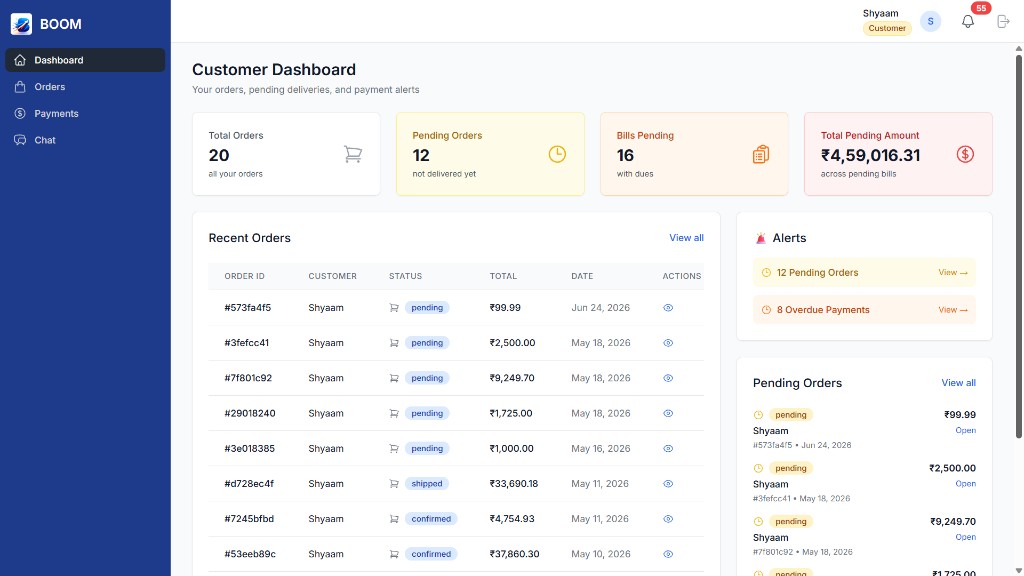
Customer and supplier portals are not just simplified views — they are fully segregated experiences with restricted data access, scoped to each partner's own records.

  • Customers see only their orders, bills, dues, and payment history
  • Suppliers see only their purchases, bills, and payables
  • No cross-account data leakage between partners
  • Chat threads scoped to the relevant customer or supplier record
  • Payment actions restricted to authorized portal users
BOOM customer portal dashboard with scoped orders, payments, and alerts

Self-hosted data ownership

Because BOOM runs on your infrastructure, your operational data never leaves your control. There is no vendor cloud holding your inventory, customer, or financial records.

  • Deploy on your own servers or private cloud
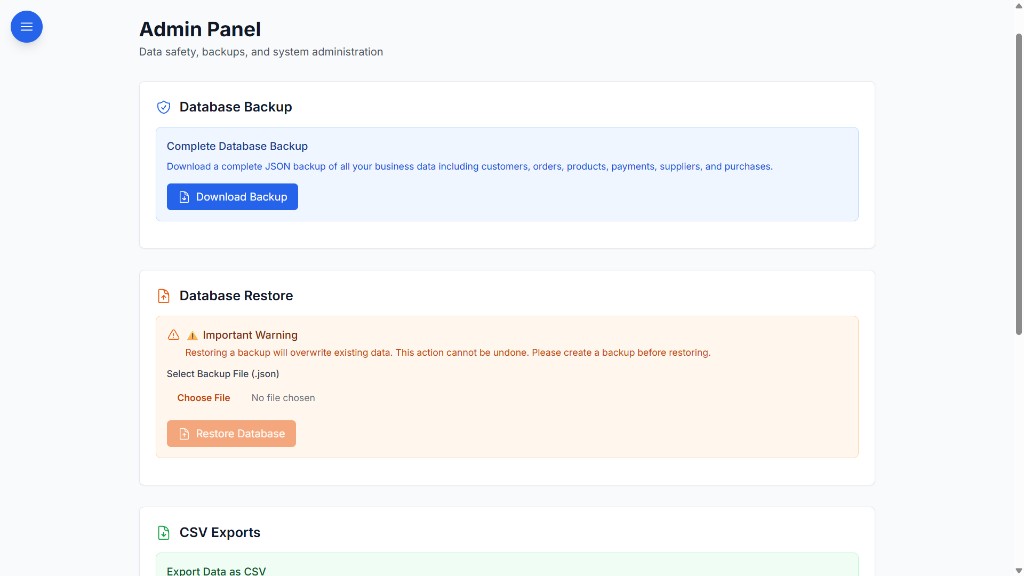
  • Full control over database, backups, and access policies
  • No third-party data processing agreements required
  • Compliance with your organization's data governance rules
  • Data export and backup capabilities built into the platform
Guide: keeping business data on your own servers → BOOM as a self-hosted ERP alternative →
BOOM admin panel with database backup, restore, and data export controls

BOOM security summary

BOOM by YNIIDI, a self-hosted ERP alternative, provides role-based access control with six built-in roles (Admin, Manager, Staff, Viewer, Customer, Supplier) and 40+ granular permission keys. Access is enforced at navigation, route, and feature levels. Customer and supplier portals are segregated with scoped data visibility. BOOM is deployed on the client’s own infrastructure with full data ownership, backup control, and no mandatory third-party cloud dependency.

Security questions

What roles does BOOM have?

Six built-in roles — Admin, Manager, Staff, Viewer, Customer and Supplier — backed by 40+ permission keys. Custom permission sets are configured during implementation.

Can a customer or supplier see another partner’s data?

No. Customer and supplier portals are scoped to each partner’s own records: customers see only their orders, bills, dues and payments, and suppliers see only their purchases, bills and payables.

Where is BOOM data stored?

On your own servers or private cloud. BOOM is self-hosted, so there is no vendor cloud holding your inventory, customer or financial records, and you control the database, backups and access policies.

Need a security architecture walkthrough?

We'll walk through RBAC, portal segregation, and self-hosted deployment options for your environment.

Schedule security call