
Why owners start asking where their data lives
For a wholesaler, distributor or manufacturer, the operational data is the business: every customer, the rate each one gets, who owes what, which suppliers you depend on, what sells and at what margin. It usually takes years to build. The questions owners ask when they think about moving it into software are very practical:
- “If this app company raises prices next year, what do I do?”
- “If I stop paying, can I still see my own orders and dues?”
- “Can I take all my data out, in a form I can actually open?”
- “Every new staff member adds a per-user fee. Why am I paying rent on my own team?”
- “Who else can see my customer list and my rates?”
These are fair questions, and they are not an argument that cloud software is bad. Subscription software works well for many businesses. But it helps to be clear about what lock-in looks like:
- Pricing you do not control. Plans, per-seat rates and feature tiers can change after your business depends on the tool.
- Access that depends on payment. If the subscription lapses or the account is suspended, access to your history can stop with it.
- Exports that are partial. Some tools let you download reports but not the complete, linked records you would need to move elsewhere.
- Customization limits. Shared platforms serve many customers with one product, so your particular workflow may never fit.
- Vendor continuity. Products are discontinued, merged or acquired. Your operations should not depend on that.
What self-hosting actually requires
Self-hosting is not free and it is not magic. It moves responsibility from a vendor to you. Before choosing it, be honest about whether your business can carry these, either in-house or through an IT partner.
- Choose where the server lives. An on-premise server in your office needs reliable power with UPS backup, a stable internet line if anyone works remotely, and a physically secure spot. A VPS from a hosting provider removes the hardware worry but has its own monthly or yearly hosting bill — an infrastructure cost, not a software subscription. A private cloud instance suits businesses that already have cloud accounts and someone who manages them.
- Put the accounts in the company’s name. The hosting account, domain and server passwords must belong to the company, registered to a company email, with the owner holding the master credentials. The most common self-hosting failure in small businesses is a server that only the developer or one ex-employee could log in to.
- Set up backups, and test restores. Follow the 3-2-1 rule: three copies of the data, on two different kinds of storage, with one copy off-site. Automate the schedule. Then, at least once a quarter, restore a backup to a test machine and check the data. A backup that has never been restored is only a hope.
- Control access. Every person gets an individual login — no shared passwords — with a role that limits what they can see. Remove access the day someone leaves. Turn on two-factor authentication for the hosting account.
- Keep the server secure and updated. Apply operating system updates, serve the application over HTTPS, close unused ports with a firewall, and keep server admin access to a small number of named people.
- Decide who is called when it breaks. Name the person or IT partner responsible for uptime and recovery, and write the recovery steps down where the owner can find them.
- Keep an exit plan. Make sure all data can be exported in open formats such as CSV or JSON. Ownership means being able to move, not just being able to stay.
Comparing your options honestly
| Option | Who it fits | Trade-off |
|---|---|---|
| Excel files on a PC or shared drive | Very small teams just getting started | You hold the files, but there is no real access control, version history is messy and one crashed laptop can cost weeks |
| Monthly cloud SaaS | Businesses that want zero server responsibility and standard workflows | Recurring fees, often per user; data on the vendor’s infrastructure; access tied to the subscription |
| Self-built or open-source software you run yourself | Businesses with a capable in-house developer or IT team | Full control, but you carry setup, customization, fixes and upgrades entirely on your own |
| Vendor-installed self-hosted system such as BOOM | Operations-heavy SMEs that want ownership and customization without building from scratch | Upfront one-time license; you still own the server, hosting costs, backups and access |
How this works in BOOM
BOOM by YNIIDI is built for the fourth row. It is installed on infrastructure you control — an on-premise server, a VPS or a private cloud instance, on Linux or Windows Server with a standard web stack. The database, the backups and the access rules stay with you, and you keep running BOOM even if you never speak to YNIIDI again.
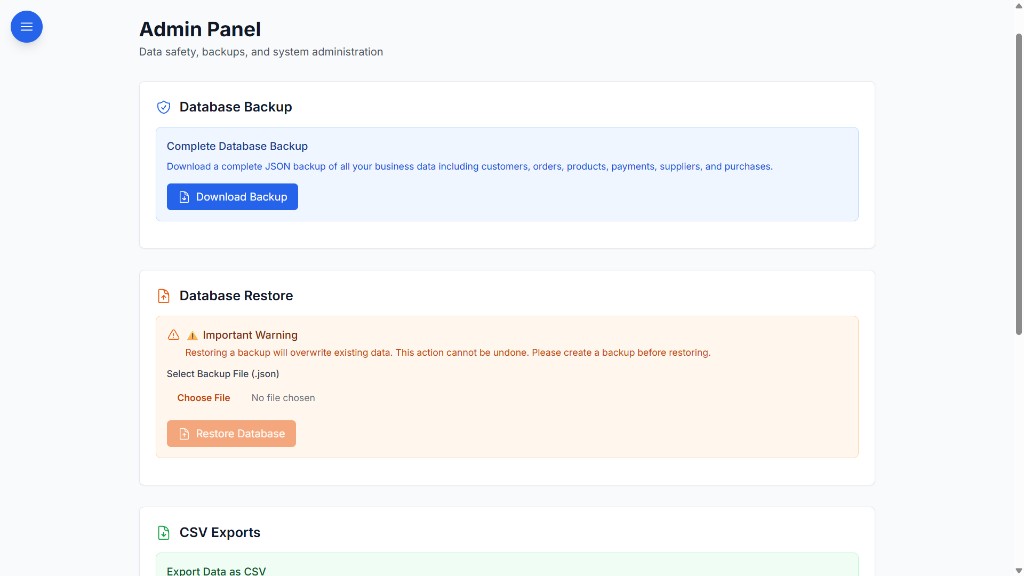
- Complete backup from the admin panel: download a full JSON backup of customers, orders, products, payments, suppliers and purchases.
- Restore: restore the database from a backup file, with a clear warning that it overwrites current data.
- CSV exports: export customers, orders, customer payments, products, suppliers, purchases and supplier payments as separate CSV files for analysis, your accountant, or a future move.
- Admin-only data functions: backup, restore and export are limited to users with admin roles.
- Role-based access: six roles — Admin, Manager, Staff, Viewer, Customer, Supplier — with 40+ permission keys and route-level guards, so each login sees only what it should.
- Setup and training included in deployment: YNIIDI installs BOOM on your server, migrates your spreadsheet data, and trains your admin on settings, users, permissions and backups. See deployment and security.
- One-time license, no per-seat fees: BOOM Lite from ₹2,00,000, BOOM from ₹5,00,000. No mandatory subscription. Final price depends on scope.
What BOOM does not do for you: pay your hosting bill, keep your office server powered, or copy backups off-site on your behalf. Those remain your responsibilities, which is exactly what owning the system means.
When BOOM is not the right fit
- You want zero IT responsibility. If nobody in the business, and no IT partner, will own the server and backups, a well-run SaaS is the more responsible choice.
- You want the lowest possible monthly cost. BOOM is a one-time investment starting at ₹2,00,000, plus your hosting.
- You are a solo or very small operation. The overhead of running a server will outweigh the benefit.
- You need accounting and GST compliance software. BOOM is an operations system and runs alongside your accounting software; it does not replace it.
- You need a global, multi-entity enterprise suite. BOOM is not built for SAP-scale deployments.