
Why udhaar tracking breaks as you grow
Almost every wholesaler and distributor in India sells on credit. Fifteen days, thirty days, “next month when my payment comes”. When you have twenty regular parties and you personally handle all of them, memory and a register work. The trouble starts when the business grows and the owner is no longer the only one giving credit or collecting money.
The questions sound like this:
- “Kitna baaki hai?” — and three people give three different numbers.
- “He says he paid last week. Did we get it? Against which bill?”
- “We dispatched another load to him — didn’t anyone check he still owes from June?”
- “The accountant’s report says one thing, the salesman’s notebook says another.”
Underneath those questions are a few very specific failures:
- Credit is given in one place and recorded in another. The order is confirmed on WhatsApp, the bill is made later, and sometimes the bill is never made.
- Partial payments are recorded as lump sums. “Received ₹40,000 from Sharma Traders” goes into the account, but nobody notes which bills it cleared. After a few months you know the balance but not how old it is.
- Payments arrive through too many channels. UPI, NEFT, cheque, cash to the delivery boy. Each lands in a different place, and matching them to bills becomes a monthly headache instead of a daily habit.
- The books are updated late. Many businesses post entries in their accounting software weekly or monthly. That is fine for GST and accounts, but the person deciding whether to send the next dispatch today is looking at last month’s picture.
- Nobody owns the follow-up. Everyone knows a party is slow. Nobody has been told to call him on Tuesday and write down what he promised.
The result is not one big loss. It is working capital stuck with customers, a few dues that quietly go bad each year, and an owner who spends evenings reconciling instead of selling.
Steps that work even without new software
You can fix most of this with discipline and a spreadsheet, as long as the order and payment volume is manageable. These steps are the same whether you use a register, Excel or a proper system — software only makes them easier to keep up.
- Clean up the customer list. One record per customer, one spelling, one contact, and the agreed credit terms written down. “Sharma Traders”, “Sharma Trdrs” and “Sharma ji (Karol Bagh)” must become one party, or their dues will never add up.
- Record every credit sale as a dated bill. Each sale gets a bill number, bill date, amount and due date. The due date comes from the customer’s terms: bill date plus 30 days, for example. No bill, no dispatch.
- Record payments against specific bills. When ₹40,000 comes in, apply it to named bills — normally the oldest first — and note the mode and reference (UTR number, cheque number, or who collected the cash). A partial payment reduces that bill’s balance; the rest of the bill keeps its original date.
- Age every open bill. In Excel, a column with
=TODAY()-BillDategives days outstanding. Group into 0–30, 31–60, 61–90 and 90+ days. A customer owing ₹2 lakh for 20 days is a very different problem from one owing ₹2 lakh for 110 days. - Run a weekly collection review. Same day every week, fifteen minutes. Sort by age, then by amount. For each serious due, assign one person to follow up and write down the promised date. Next week, start with the promises that were missed.
- Set a credit hold rule in advance. Decide, as the owner, when new dispatches stop: over a credit limit, or once any bill crosses 60 days. The salesperson in front of a customer should not be making that call on the spot.
- Send bill-wise statements and reconcile. Share a statement listing each open bill, not just a total. Disputes (“that bill was returned goods”, “we paid that by cheque”) surface in week two instead of month six. Match recorded payments to the bank statement every week.
If you do only one thing from this list, do step 3. Applying payments to bills is what makes ageing, statements and follow-ups possible at all.
Comparing your options honestly
There is no single right tool. What fits depends on how many credit customers you have, how many people take orders and collect money, and how quickly you need the picture to be current.
| Option | Works well when | Where it breaks for dues |
|---|---|---|
| Notebook or khata register | One person handles all credit and a few dozen parties | No ageing, no sharing, lost if the book is lost; depends on one person’s handwriting and memory |
| Excel or Google Sheets | One disciplined owner maintains it; low order volume | Several editors create conflicting versions; payments rarely get applied bill-wise; stock and orders live in separate files |
| Mobile billing and khata apps | Small shops and traders who want quick credit entries and reminders on a phone | Usually built around one user or counter; may not connect dues to your order workflow, stock and suppliers; data sits with the app provider |
| Accounting software such as Tally | Books, GST and statutory reporting, handled by an accountant | Outstanding is only as current as the last posting; sales and dispatch teams often do not work in it day to day |
| Operations system such as BOOM | Multiple staff take orders, dispatch and collect; you want dues tied to orders in real time | More setup than a sheet; a one-time investment that only makes sense at a certain scale |
Many businesses end up with two tools: accounting software for the books, and something else for daily operations. The mistake is when the “something else” is five WhatsApp groups and a personal notebook.
How this works in BOOM
BOOM is built so that a due is never separate from the order that created it. Every order carries an invoice number, the amount billed and the amount still owed. When money comes in, it is recorded against that order, including partial payments, with the payment mode, transaction reference and notes.
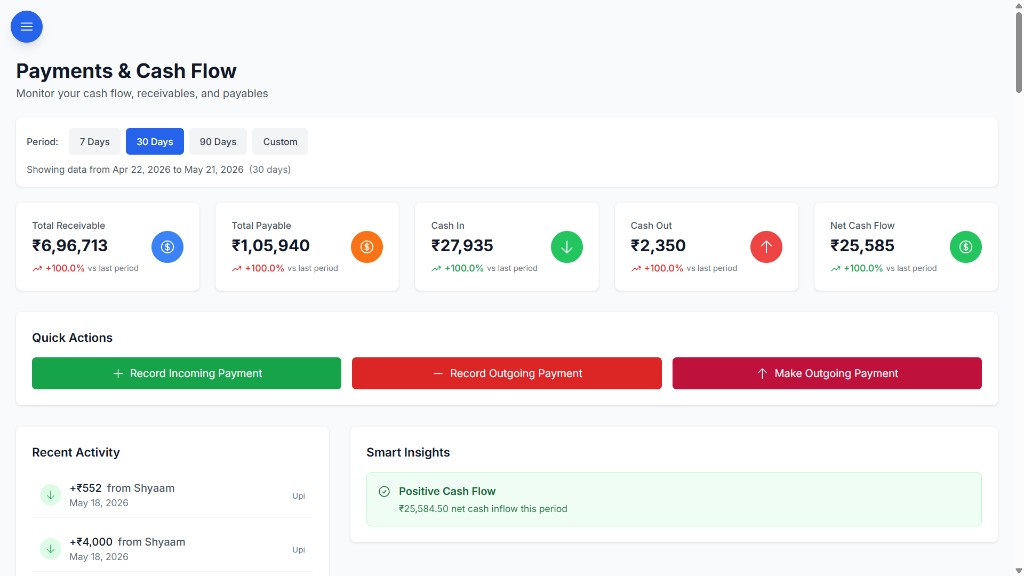
- Customer view: each customer record shows order history, what has been paid and what is still due, so “kitna baaki hai” is a lookup, not a debate.
- Payment history with filters: every payment carries its transaction reference and notes, and the history can be filtered, which makes the “I paid you last week” conversation short.
- Oldest dues first: because every due sits on a dated order, you can see which bills have been open longest. If you want formal ageing buckets or credit-hold rules, those are scoped during customization, since BOOM is set up around your workflow.
- Customer portal (full BOOM edition): customers log in and see their own orders, bills, pending dues and payment history, and can pay through Razorpay checkout. That removes a lot of “send me my statement” calls.
- Notifications and roles: push notifications flag payments; role-based access means a salesperson can see a customer’s dues before promising another dispatch, without seeing your profit numbers.
- Export for your accountant: orders and payments can be exported, so the books in Tally or your accounting software can be kept in step.
BOOM runs on your own server or VPS and is bought with a one-time license — BOOM Lite from ₹2,00,000, and the full BOOM edition with the customer portal and payment gateway from ₹5,00,000. Final price depends on scope.
When BOOM is not the right fit
- You have a handful of credit customers. If one person can keep twenty parties in a well-maintained sheet, the steps above are enough. Do those first.
- You want a low monthly app. BOOM is a one-time license starting at ₹2,00,000. If a small monthly subscription is what fits your budget, a billing or khata app will serve you better.
- You need GST returns, e-invoicing or e-way bills. That is accounting and compliance software territory. BOOM does not file returns or replace your accountant’s books; it runs alongside them.
- You are a very large, multi-entity enterprise. If you need a full SAP-scale suite across countries and legal entities, BOOM is not built for that.